
Formulas, tables and conditions
Let a design decide for itself: choose sizes by conditions, look values up in tables, switch parts on and off, and draw curves from formulas.
Every size in 3DCraft can be a formula of the document's variables (How 3DCraft thinks). This chapter is about the formulas that make a design smart: they are what turns a part into a Jig with options (Using a Jig), and what makes an involute gear exact. An agent writes them for you when you ask ("four ribs when it is longer than 200 mm", "a lid as an option"); here is what they look like.
Conditions: if, choose, clamp
Choose a size from another: four ribs on a long part and two on a short one, a wall that grows with the part but stays between limits, a bore picked from a list.
A comparison (<, <=, >, >=, ==, !=) is 1 when it holds and 0 when it does not; both sides
have the same dimension. && (and), || (or) and ! (not) combine them. Three functions choose:
[
 ["variable.set", {"name": "length", "expr": "240 mm"}],
 ["variable.set", {"name": "size", "expr": "2"}],
 ["variable.set", {"name": "ribs", "expr": "if(length > 200 mm, 4, 2)"}],
 ["variable.set", {"name": "wall", "expr": "clamp(length / 50, 1.2 mm, 5 mm)"}],
 ["variable.set", {"name": "bore", "expr": "choose(size, 3 mm, 4 mm, 5 mm)"}]
]
if(condition, a, b)isawhen the condition holds, elseb. Only the chosen one is worked out, so the other may fail:if(n > 0, total / n, 0 mm)does not divide by zero.aandbhave the same dimension; the branch not taken is only checked for that when it can be worked out. A name that is no variable at all (a typo) is refused in either branch, so it shows before the condition flips.clamp(x, low, high)keepsxbetween the bounds;lowmay not be abovehigh.choose(i, a, b, ...)is thei-th value, counted from 1 (ia whole number).==treats two values as equal when they differ by less than a part in 10^12, so0.1 + 0.2 == 0.3holds. Compare values with each other, not their difference with zero:sin(pi) == 0is false.- Order, loosest first:
||, then&&, then!, then the comparisons, then+ -,* /and^:a > 1 && b > 1 || cis((a > 1) && (b > 1)) || c,!a > bis!(a > b)and!a + bis!(a + b): put the operand of!in parentheses when you mean less ((!a) + b).a < b < cis refused: writea < b && b < c. variable.seton an existing name changes it, and every feature that uses it is rebuilt.variable.renamerenames it everywhere it is used.variable.deleterefuses a variable that is still used and names what uses it; with"force": trueit deletes it anyway, and what used it then fails (undo brings it back).
Tables
Use a table when a part comes in standard sizes: pick a row, and every value of that row follows.
A table holds values a model looks up by row: the sizes of a belt profile, a series of standard
modules. Each column has a name and, for numbers, a unit; one column, the key (the first unless key
says otherwise), names the rows.
[
 ["table.set", {"name": "belt", "columns": ["profile", {"name": "pitch", "unit": "mm"}, "teeth"],
                "rows": [["GT2", 2, 20], ["HTD3", 3, 30]]}],
 ["variable.set", {"name": "profile", "expr": "1"}],
 ["variable.set", {"name": "pitch", "expr": "belt[profile].pitch"}],
 ["variable.set", {"name": "teeth", "expr": "belt[\"HTD3\"].teeth"}],
 ["variable.publish", {"name": "profile", "kind": "choice", "choicesFrom": "belt"}]
]
belt[profile].pitchis thepitchof rowprofile, counted from 1;belt["HTD3"].pitchfinds the row by its key. The value has the column's unit, sopitchis a length here. A row the table does not have, a column it does not have, or a text where a number is needed fails the variable with that reason.table.setreplaces the whole table in one undo step, and everything that uses its values is rebuilt.table.listshows the tables and what uses them;table.renamerenames a table everywhere;table.deleterefuses a table that is still used (with"force": trueit deletes it anyway).- A choice parameter with
choicesFromoffers the table's keys (here GT2 and HTD3) and follows the table when it changes: it keeps its key when rows move, and when its key is removed it becomes 0 (no choice) andtable.setwarns underparameterWarnings.param.settakes a key as the value; a JSON number is always the row's number. Keys that are numbers are looked up by how they are written:t["2.5"]. - A cell is a number or a short text (at most 64 characters, no quotes); at most 10 000 rows and 64 columns. A table and a variable never share a name.
Switching parts on and off
Make a part optional: a lid, flanges, a hub, a second row of holes. Turn on a switch on a Jig's form and the part appears; turn it off and it is gone, with everything after it still built.
feature.suppress {"feature": "Round"} switches a feature off by hand; "suppressed": false switches it
on again. feature.when switches it by a condition, an expression kept with the feature and
evaluated at every regeneration: the feature is built when it is a number other than zero, and is
inactive when it is zero.
These lines show the form only: they belong to a design that already has features named Lid, LidFillet, GT2 tooth and Flange, and the variables they use. In a new document they fail, as there is nothing to switch.
[
  ["feature.when", {"feature": "Lid", "expr": "lid"}],
  ["feature.when", {"feature": "LidFillet", "expr": "lid"}],
  ["feature.when", {"feature": "GT2 tooth", "expr": "profile == 1"}],
  ["feature.when", {"feature": "Flange", "expr": "flanges && teeth < 40"}]
]
Give the condition with the feature. The commands that add a feature (feature.block,
feature.extrude, feature.fillet, datum.plane, …; not sketch.create, body.split and
file.import, whose features get a condition with feature.when) take it as when, so the feature is switched from
its very first regeneration: a fillet of a lid that is off is never built, and never fails on the way.
It is one step, one undo, as if feature.when had come with it; an extrusion with cut or join gives
the condition to both features it adds. This one runs as it is, in a new document: set lid to 0
afterwards, and both features are off.
[
  ["variable.set", {"name": "lid", "expr": "1"}],
  ["feature.cylinder", {"radius": "8 mm", "height": "2 mm", "position": [0, 0, 30], "name": "Lid", "when": "lid"}],
  ["feature.fillet", {"edges": [["Lid:face(0)", "Lid:face(2)"]], "radius": "0.5 mm", "name": "LidFillet", "when": "lid"}]
]
A boolean public parameter (lid) or a choice (profile == 2) then switches parts of the model from a
form, with param.set. "expr": null takes the condition away. Comparisons, &&, ||, ! and if
work as in any expression; a condition with a unit (3 mm), or one that does not evaluate, fails the
feature with the reason. A suppressed feature stays off whatever its condition. variable.rename and
table.rename rewrite conditions too, and variable.delete names a feature whose condition uses it.
To make a part disappear, put the condition on the feature that makes it. A feature that changes a
body passes it on unchanged when it is off: a transform with "expr": "0" leaves the body where it was
(it is not moved, and it does not disappear), and a fillet that is off leaves the edge sharp. The block,
the extrusion or the union that brings the part in is the feature to switch: with it off, everything made
from it goes with it. In document.inspect a feature that is off says what it passes on: passesOn with
the feature whose body that is, or passesNothing with the reason; in the feature list, hold the pointer
over it.
In detail, a feature that is off, by hand or by its condition, behaves as if it were not in the history:
- one that changes a body (a boolean, fillet, chamfer, face operation, shell, thread, pattern, or a
transform or mirror without
keep) passes that body on unchanged; what comes after it is built from the body as it was before it.document.inspectsayspassesOnwith the feature whose body it is; - one that makes a body (a block, an extrusion, a sweep, a thicken, a copy with
keep) makes none. A boolean that used it as its tool passes its target on; a union that used it as its target passes its tool on; a subtraction or intersection that used it as its target makes no body, and its tool goes with it (no cutter is left over; withkeepToolthe tool stays); a pattern, transform, mirror or shell of it makes none either (passesNothingsays why); - its faces and edges are not there for a fillet, a chamfer or a face operation: the others it names
are changed, and one left with none passes its body on unchanged. An optional boss united with a plate
and chamfered gives the plain plate when the boss is off, whether the chamfer has the condition too or
not. A thicken left with no faces makes no body, and a shell opened only on such faces passes its
body on unchanged (it is never sealed shut).
document.inspectlists what a feature left out underleftOut, with the reason, and so does its tooltip in the feature list; - what it was given (a material, a colour, a face colour) follows the body it passes on, where that body has none of its own (Modelling features › Colours and materials);
- a sketch on a face only the switched-off feature makes, an extrusion up to (
upTo) such a face, or a datum on such a face, edge or vertex, fails, naming the feature that is off. Give it the same condition, so they come and go together.
A sketch or a datum that is off is not there for what refers to it: an extrusion of a sketch that is off
fails, so give the extrusion the same condition. In document.inspect, ui.get and the feature list an
inactive feature has the status inactive, distinct from suppressed; the list shows it greyed with a
when mark, and its condition on hover. Switched on again, the feature gives exactly the bodies it gave
before.
Curves from formulas
sketch.curve draws the curve x(t), y(t) for t over a range, in the sketch's axes. x and y are
expressions in t and the document's variables; inside them t is the curve's own parameter, also when
a variable is called t (that variable is not reached there, and a variable used there cannot be renamed
to t). The range t: [from, to] is two expressions in the variables, both plain numbers, both angles
or both lengths. A plain t inside sin, cos and tan is in radians. An Archimedean spiral of one
turn, closed along the x axis:
[
 ["variable.set", {"name": "a", "expr": "10 mm"}],
 ["variable.set", {"name": "b", "expr": "3 mm"}],
 ["sketch.create", {"name": "Spiral"}],
 ["sketch.curve", {"sketch": "Spiral", "x": "(a + b * t) * cos(t)", "y": "(a + b * t) * sin(t)", "t": [0, "2 * pi"]}],
 ["sketch.line", {"sketch": "Spiral", "from": "e2", "to": "e1"}],
 ["feature.extrude", {"sketch": "Spiral", "distance": "2 mm"}]
]
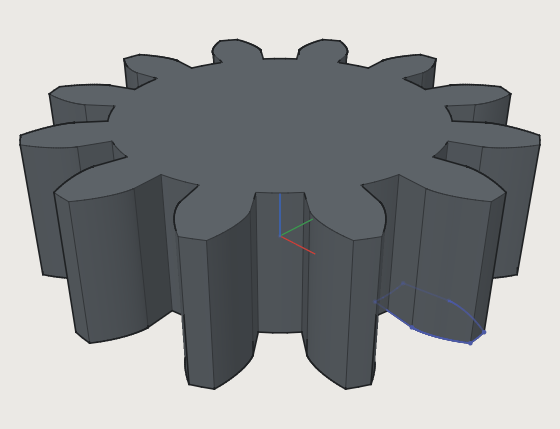
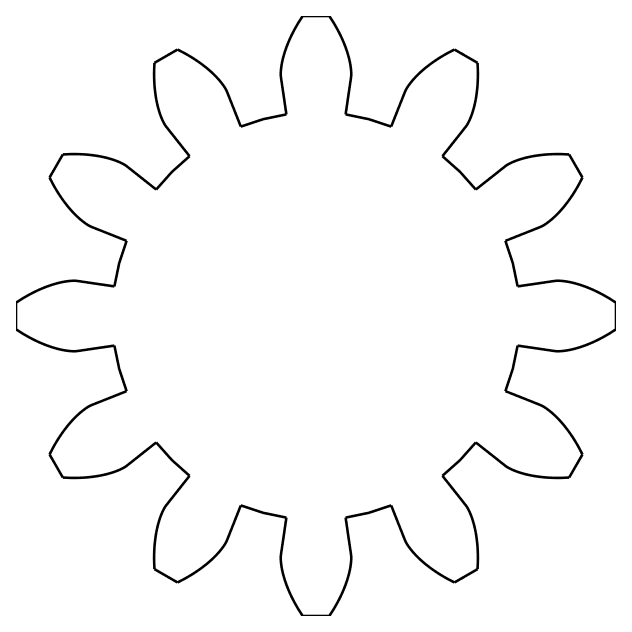
The flank of an involute gear tooth, from the base circle rb to the tip circle ra, is
x = rb (cos(t) + t sin(t)), y = rb (sin(t) - t cos(t)) for t from 0 to sqrt((ra / rb)^2 - 1);
the gear example turns it to its place by adding an angle g to t inside the
sin and cos, and mirrors it for the other flank. Change the module module, the number of teeth z
or the pressure angle alpha, and every flank is computed again:
- The curve is fitted again at every regeneration, so it follows the variables: a cubic B-spline within
half the document's tolerance of the formulas at every point checked (three in every span between
samples, refined until they hold), with its ends exactly where the formulas put them.
sketch.curveandsketch.inspectgive thefit:controlPointsanddeviation, the largest distance found. - It ends on two points (
e1ande2above; orstartandend, existing points), which the curve holds in place: lines, arcs and splines built on them close a profile with it. A constraint that would move them fails the sketch. When the ends meet the curve is closed (one point) and a profile on its own. - A formula that fails somewhere in the range (
1 / (t - 1)), is not finite, gives a single point, or jumps cannot be fitted: the command, or later the sketch, says why and near whicht. A kink is rounded within the tolerance or refused; split the curve there into two for a sharp corner. - A formula curve has no unknowns of its own, but takes
pointOn(a point held on the curve as fitted, so within half the tolerance of the formulas) andtangent: with a line, an arc, a spline or a live spline that ends on one of its end points, the other curve leaves that point along it; without a shared end, a line or a circle touches it anywhere (a line where the curve runs parallel to it, the place nearest the line; a circle at the foot of its centre, on the side the centre starts on). Two formula curves take notangent: nothing moves either.
A spline through computed points. sketch.spline with "live": true and through keeps the points
as they are and fits the spline through them again at every regeneration, so points held by expressions
(["r * cos(30 deg)", "r * sin(30 deg)"]) or by constraints move it; without live the spline is fitted
once and then shaped by its control points. A live spline takes pointOn and tangent as a formula curve
does, and what hangs on it follows its points.
Next: Modelling features.