
Assemblies
Put parts together: place instances of your documents and Jigs in an assembly, give each its own sizes, join them with mates, play the motion, and export the whole as one STEP file with its structure.
An assembly is a document of its own, saved as a .3dcraftasm file. It holds no features. It holds
instances of other documents (parts, Jigs, or other assemblies) and mates that say how they sit
against each other. An instance is a reference, not a copy: you edit a part in its own document, and the
assembly follows when you save it.
Open one first
The start screen has four assemblies under Assemblies: Horizontal toggle clamp, Jansen linkage walker, Scissor car jack and Seven-cylinder radial engine with its valve train. Click Assemblies above the cards, then Horizontal toggle clamp: the clamp that holds a workpiece down on a bench, a handle, a link and a bar joined as a four-bar linkage. It opens in a tab of its own, with its player on Motion, ready to play.
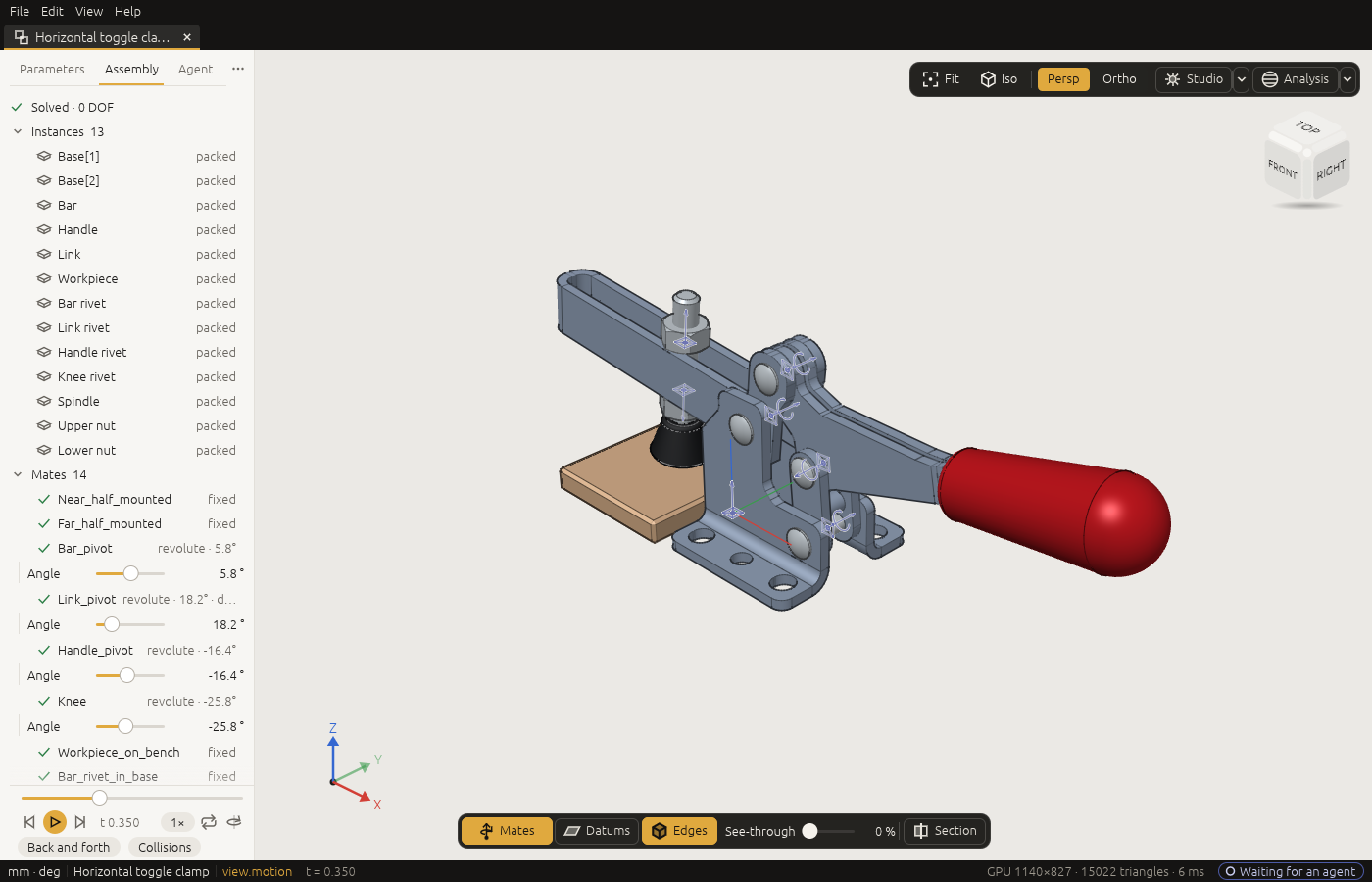
- The side panel shows the Assembly tab. It lists the instances, the placed parts, and under them the mates, the joints between them, with how many degrees of freedom are left. The player is at its foot.
- Press Space with the pointer over the view: the clamp plays its motion, opening and closing. The player is in Motion mode (The window › Playing a motion).
- Double-click an instance in the list to fly to it; Open opens its part in a tab of its own.
- The Parameters tab, beside Assembly, holds the clamp's sizes: the workpiece's height, how far the handle opens and the spindle's reach. Click Assembly to come back to the player.
A small assembly, step by step
Two bars, one turning on the other. These are the commands an agent sends. The four blocks are one
script in four parts: step 2 places the bar step 1 saved, and only step 4 saves the assembly. To run
them yourself, put the steps of all four blocks into one list, in this order (leave out the ] that ends
a block and the [ that starts the next, and put a comma between them), save it as two-bars.json and
run it: craft3d-cli run --new '{"units":"mm"}' --script two-bars.json
(The command line and scripts).
1. A part to place. A bar whose length is a public parameter, saved as bar.3dcraft:
[
  ["variable.set", {"name": "len", "expr": "60 mm"}],
  ["variable.publish", {"name": "len", "label": "Length", "min": "20 mm", "max": "200 mm", "step": "1 mm"}],
  ["feature.block", {"size": ["len", "10 mm", "5 mm"], "name": "Block"}],
  ["file.save", {"path": "bar.3dcraft"}]
]
2. The assembly, and the bar placed twice. The second instance is 80 mm long: a part with public parameters can be placed with other values.
[
  ["assembly.new", {"units": "mm"}],
  ["instance.add", {"source": "bar.3dcraft", "name": "Base"}],
  ["instance.add", {"source": "bar.3dcraft", "name": "Arm", "position": [0, 0, 10], "params": {"len": "80 mm"}}]
]
3. Mates. The base is fixed to the world, its bottom face on the XY plane. The arm stands on the base's top face and turns about the axis square to it, set to 30 degrees:
[
  ["mate.add", {"kind": "fixed", "a": "world/xy", "b": "Base/F1:face(0)", "name": "Ground"}],
  ["mate.add", {"kind": "revolute", "a": "Base/F1:face(1)", "b": "Arm/F1:face(0)", "name": "Hinge"}],
  ["joint.set", {"mate": "Hinge", "value": "30 deg"}],
  ["assembly.solve", {}]
]
assembly.solve answers "ok": true and "dof": 0: every mate is met, and nothing is left free.
4. A motion, and a check over it. A timeline t drives the hinge a full turn. The check says the two
bars never overlap, and motion.check measures it at 17 moments of the turn:
[
  ["variable.set", {"name": "t", "expr": "0"}],
  ["variable.set", {"name": "Hinge_angle", "expr": "360 deg * t"}],
  ["assert.add", {"name": "no clash", "measure": "overlap", "of": ["Base", "Arm"], "is": false}],
  ["motion.check", {"samples": 17}],
  ["file.save", {"path": "two-bars.3dcraftasm"}]
]
motion.check answers "ok": true: no clash passed at every moment. Open two-bars.3dcraftasm in the
window and play it: the arm turns round on the base.
The rest of this chapter is what an agent does for you; read it when you want to ask for particular mates, couplings or checks. It goes through each part in detail.
Instances
instance.add places a document: a part, a Jig, or another assembly.
- Where it comes from. The
sourceis read from the folder 3DCraft may read from, and kept as a path relative to the assembly's file, with the SHA-256 of its bytes. - Where it starts.
positionandrotation(a rotation vector in degrees) say where an instance starts; mates move it from there. - Units. A part drawn in another length unit (inches in a millimetre assembly) is rebuilt in the
assembly's unit at its own size. Its parameters are set in its own unit first, so a bare number for a
length parameter of an inch part means inches (
"params": {"w": "2"}is 2 in). Write the unit to be sure ("50.8 mm").
Sizes per instance. A part with public parameters (a Jig's, or any variable.publish) can be placed
with other values: "params": {"len": "80 mm"}, or an expression of the assembly's own variables
("params": {"len": "long"}). A value is held to the parameter's range, not to its step. Each different
set of values is a configuration, built once however many instances use it.
When a feature of the part fails with the values given (a fillet too large for the plate), the instance is
still placed with the bodies from before that feature, as the part itself shows them, but it says so:
assembly.inspect gives the instance featureFailed (its feature Plate (F2) failed: radius: too large
for edges.0; through a subassembly, its instance Plate: …), its row in the Assembly tab is marked ⚠
with the reason in its tooltip, and the assembly's document.check is not ok.
One body of a multi-body part. "body": "Gear" shows only the body the feature Gear made, where the
part puts it. This is how the bodies of an existing Jig become parts of an assembly. If the part changes
so that Gear makes no body any more, the instance says so by name; it never shows another body instead.
Following the part. An open assembly follows its parts by itself. Save a part (also in the tab
instance.open opened) and every open assembly that uses it shows the new version. A part changed by
another program is read again when you switch to the assembly's tab or come back to the window. A part
that changed and cannot be read again (moved, deleted) keeps showing the last version, and its row in the
Assembly tab says why (⚠). assembly.reload reads the sources again by hand and lists the instances whose
part changed.
Pinned. "pinned": true keeps an instance to the part as it is now. Those bytes are kept in the
assembly's file, so the instance shows them whatever the part's file holds later; its row is marked ⚠ once
the file changed. assembly.pack packs them.
Mates
A mate joins geometry of two instances. It names that geometry through the instance, with the part's own
names: Base/F1:face(1) is the top of the block F1 of the instance Base. Or it names the world:
world/xy, world/z, world/origin.
Each side gives a frame: a flat face gives its plane at the face's centre with its outward normal, a round face its axis, a circular edge its centre and axis, a corner a point, a datum of the part its own. The world's frames all sit at the origin:
| Reference | Its z (the axis a joint turns about or slides along) | Its x (where an angle of 0 points) |
|---|---|---|
world/xy, world/z, world/origin |
the world's z | the world's x |
world/yz, world/x |
the world's x | the world's y |
world/zx, world/y |
the world's y | the world's z |
Any other world/... is refused when the mate is made. The second frame is put against the first, facing
it ("flip": true keeps it the same way round), moved by offset and turned by angle.
| Kind | What stays free |
|---|---|
fixed |
nothing |
revolute |
a turn about the axis (<mate>_angle) |
slider |
a slide along it (<mate>_distance) |
cylindrical |
both |
planar |
sliding in the plane and turning in it |
ball |
turning about the point |
joint.set sets a free motion. It makes the assembly variable Hinge_angle, which you can use in formulas
and publish as a parameter (it then shows as a slider). assembly.solve says whether the mates are met
and what each instance can still do. A mate on a face that is gone from the part fails with that face's
name and never moves to another face.
Closed loops (a four-bar linkage) are solved as a whole, and assembly.solve says which mates contradict
each other, and by how much, when they cannot all be met.
Couplings. Gears, racks and screws couple two mates:
coupling.add {"kind": "gear", "mates": ["A", "B"], "value": 2}. A screw may name one cylindrical mate
twice, a thread whose slide follows its own turn: {"kind": "screw", "mates": ["Thread", "Thread"], "value": "3 mm"} advances 3 mm a turn.
A linear coupling ties any number of motions, each with a coefficient: the sum of coefficient times motion is the value (0 unless given). A planetary stage, the ring held, turns the carrier by Willis' formula:
[
  ["coupling.add", {"kind": "linear", "name": "Stage", "terms": [
    {"mate": "Sun", "coefficient": "12"},
    {"mate": "Ring", "coefficient": "36"},
    {"mate": "Carrier", "coefficient": "-48"}]}]
]
A term's motion is the mate's main free motion unless you name it (angle, distance, x, y). An
angle counts in radians, so a rack of 5 mm radius is [{"mate": "Slide"}, {"mate": "Turn", "coefficient": "-5 mm"}], and two sliders where one moves twice as far as the other are [{"mate": "A"}, {"mate": "B", "coefficient": "-2"}]. A coupling whose mate fails, whose mate has no such motion, whose terms differ in
kind (a length against an area), or whose value does not evaluate, fails by name, and assembly.solve is
not ok.
In the window
The side panel's Assembly tab is the assembly's tree: the instances (a subassembly's own nested under it), then the mates with their kind and value, and how many degrees of freedom are left. Under them are the assembly's checks, with the player at the foot. Click a row to select the instance, double-click to fly to it; the eye hides it, and Open opens its part in a tab of its own.
Every joint you can set by hand is a slider on the Parameters tab: the joints the assembly stays
solved with. In a linkage that moves one way (a four-bar), the joints that move it have a slider until you
set one; then that one drives the loop and is its only slider. In the view, Alt and a drag on a part
moves it along its free motion: drag the crank and the linkage follows (a part fixed to the world does not
move). Both are joint.set, and one drag is one step to undo.
To join two parts, select a face of each (Shift+click the second), right-click and choose Revolute
between these (or Fixed, Slider, Cylindrical, Planar, Ball): that is mate.add.
Motion
An assembly plays over the timeline t as a part does
(The window › Playing a motion): give it a variable t and drive a joint by
a formula of it, as step 4 above does.
Each moment is solved from the one before it, so the linkage stays the way it was assembled (elbow up
stays up), and the same t always shows the same state. Where the mechanism cannot go further (a dead
point), view.motion says so with the t it stopped at, and motion.check lists every dead point it
meets.
A trace names its point through an instance, as a mate does: view.trace {"point": "Coupler/End2"}. In the
window the trace of an assembly is worked out in the background, so a play does not stop for it; read it
with view.trace {"name": …, "wait": true}.
An instance whose parameters are formulas of t (a belt whose loop follows the carriage) is a new
configuration at every moment, built when the moment is first shown. motion.bake builds them all ahead,
side by side, so the motion then plays smoothly: ["motion.bake", {"frames": 120}] makes the moments
t = k / 120 (add "collisions": true to find the collisions too). It changes nothing in the document;
an edit lets go of what it made. In the window the player does not wait for these shapes: it shows the
parts where they are at once, a belt for a moment with the shape it had nearest, and bakes the motion in
the background by itself, so the second play is exact and smooth. Over the control channel, motion.bake
returns at once in the window; {"cancel": true} stops it.
Subassemblies
An instance of a .3dcraftasm is a subassembly. By default it moves as one block ("mode": "rigid"); "mode": "flexible" lets its own joints move in the parent, with its own couplings. Mates reach
into it through its instances: Leg/Arm/F1:face(1). An assembly that would contain itself is refused.
A flexible subassembly's own drives (a joint it sets with joint.set, or drives by its own t) are
free in the parent unless the parent sets what they depend on. Publish the variable in the subassembly
(the joint's own Hinge_angle, or a swing it follows) and give it in the instance's params. So a leg
that plays its own motion can also be turned by the machine it is part of. To play the leg's own motion in
the parent, publish its t and pass the parent's on: "params": {"t": "t"}.
Packing, export and checks
assembly.packputs copies of all parts into the.3dcraftasmfile, so it opens anywhere;assembly.unpackwrites them out as files again.file.exportto.stepwrites the assembly with its structure: each part once, placed by every instance. STL, 3MF and OBJ hold the placed bodies. Hidden instances are left out of all of them, and the result'shiddenLeftOutnames them; a body named inbodiesis written, hidden or not.assembly.inspectlists the instances, their configurations, the mates and how they stand.
Checks name instances, as step 4 does. The measures take their subjects as in a part
(Measuring and assertions): clearance and distance take from and to; volume,
area, mass, extent, thickness and the others take of; overlap takes of, and to beside it.
With of alone, overlap asks whether any two of those bodies overlap; with to, whether any of of
overlaps any of to ({"measure": "overlap", "of": "Lid", "to": "Box", "is": false}).
A subject names bodies the same way everywhere in an assembly:
- an instance's name means all its bodies:
Arm, however many bodies its part has;Sub, every body of a subassembly, rigid or flexible; Instance/Bodynames one body by the name of the feature that made it in the part, also when the part has one body:Arm/Block;- a path reaches into a subassembly:
Sub/Inner,Sub/Inner/Block.
Every measure.* command that takes a subject names them the same way on an assembly, and labels each body
in its answer by its instance's name. A name is looked up as a shown body's name first (an instance of one
body), then as an id (F3), then as an instance or a path: an instance named like an id is reached by that
name only where no shown body has that id, so name instances otherwise. {"body": …, "follow": true} names
a shown body only, not a path. Renaming an instance renames it in its checks; an instance a check names is
not deleted until the check is.
What the solve says is measured too. jointAngle {mate} and jointDistance {mate} are a joint's
solved value, driven or free; position {instance, axis} (or {point: "Foot/Toe"}) and
rotation {instance} an instance's pose. The pose measures reach an instance inside a rigid subassembly by
its path too. As checks they hold over the motion (motion.check gives an angle's least and greatest value
and each sample in degrees, "unit": "deg", as the bounds are written). With variable.measure they become
outputs that formulas use: {"name": "crank", "measure": "jointAngle", "mate": "Drive"}, then 2 * crank
in an output or a check. measure.joint {mate} and measure.pose {instance} answer them at once (angles in
degrees).
Next: Files, export and drawings.